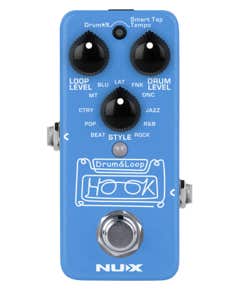


NUX NDL-3 Hook Drum and Loop Pedal

h m s
Compare
Compare! Here are all the serial numbers of this model we have in stock. Compare them all and select your favorite!





Fast & Free Shipping
Did you know AMS is the only music distributor with four distribution centers? And that means we can offer super-fast shipping on all your music products. Whether you don’t want the spark of inspiration to fade or you really need that replacement speaker before the next show, we have you covered anywhere in the U.S. And even better, it’s FREE!

Free 12 Month Extended Warranty
You shouldn’t have to pay extra for a little peace of mind. When you purchase from AMS, you’ll get a free 12-month extended warranty to cover your purchase — and that’s in addition to any manufacturer’s warranties! Thousands of items in our catalog feature the “Gold Lock Extended Warranty,” so you can feel confident in your purchase.

45 Day return
Sometimes the gear on the computer screen seems like a better fit than when you actually get your hands on it. We understand, and that’s why AMS offers an industry-leading 45-day money-back guarantee. If you’re not happy with an item, you have a full month and a half to send it back! We don’t want to just sell you gear. We want to sell you the RIGHT gear — even if it takes a few tries.
Canadian Shipping Information
Welcome Canadian musicians! Buying your gear from AMS is as easy as going to a local music store, with more selection and more than competitive prices!
Items with this logo are eligible to ship to Canada. Please note that you will be responsible for payment of brokerage fees, duties and other import taxes applicable to your order.
NOTE: Free shipping offers do not apply to Canadian orders. Please be aware of custom fees - such as taxes and duties - when your order arrives. Since these fees vary from location to location, CUSTOMS FEES ARE NOT INCLUDED IN SHIPPING CHARGES. Please check with your local customs office for more information on the fees in your areas. Refusal to pay these fees will result in an undeliverable order. If returned, we do not refund shipping charges and may assess restocking fees to cover return shipping expenses.
0% Interest Payment Plan
Don’t sell your soul to a creditor to get the gear you need. At AMS, we want to lower the barriers to create. That’s why we offer in-house 0% financing, and you don’t even have to open a new line of credit! Spread out payments on your credit card to simplify financing and avoid hefty late fees or service charges. Cost shouldn’t interfere with your creativity.
Minor Blemished Product
Minor Blemished Products are items that have been returned in excellent condition with very minor cosmetic blemishes, allowing you to get great gear at a discounted price. In fact, many times our customers have difficulty finding the minor blemishes at all! These products are 100% inspected and tested to guarantee functionality. They include all components, manuals and the full Manufacturer's warranty unless otherwise stated, along with the AMS 45-Day Money-Back Guarantee to ensure your satisfaction. Special offers, promotions and rebates may not apply. The following manufacturers do not offer a warranty on Minor Blemished products: Casio, Ampeg, Avalon, Chauvet, Electro-Voice, Epiphone, Gibson, Ibanez, Kramer, Mackie, Maestro, Mesa, Peavey, PreSonus, Steinberger, Tobias